

Blog
How to Improve Seo of Ecommerce Website Site Audit: Ultimate Guide
Feb
Running an ecommerce website is exciting. But, to get visitors, your site must rank well on Google. This is where SEO comes in. SEO means Search Engine Optimization. It helps your website appear in search results. The better your SEO, the more people find your site. But, how can you improve your SEO? A good way is by doing a site audit.
What is a Site Audit?
A site audit is like a check-up for your website. It looks at many parts of your site to find what works well and what needs fixing. For ecommerce sites, this is very important. It helps you see if your site is easy to use and if Google can find your pages. After the audit, you get a clear plan to make your SEO better.
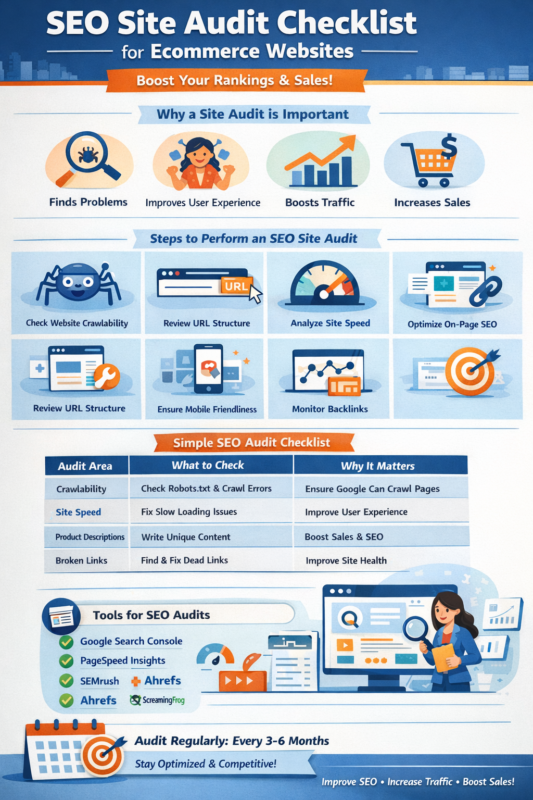
Why is a Site Audit Important for Ecommerce SEO?
- Finds Problems: It spots issues that stop your site from ranking well.
- Improves User Experience: A smooth site keeps visitors happy and more likely to buy.
- Boosts Traffic: Better SEO means more people visit your site.
- Increases Sales: More visitors can lead to more customers.
Steps to Perform an SEO Site Audit for Your Ecommerce Website
1. Check Website Crawlability
Google uses bots to read your site. This is called crawling. If bots cannot crawl your pages, they cannot rank them. Check if your site allows bots to crawl all important pages. Use tools like Google Search Console to see crawl errors. Fix broken links or blocked pages.
2. Review Your Site’s Url Structure
Your URLs should be simple and clear. Good URLs help Google and users understand page content. For example, www.shop.com/shoes/running is better than www.shop.com/page?id=123. Use keywords in URLs where possible. Avoid long or confusing links.
3. Analyze Site Speed
Fast sites make visitors happy. Slow sites lose visitors quickly. Use tools like Google PageSpeed Insights to check your site speed. Fix issues like large images, slow hosting, or too many scripts. A faster site helps SEO and user experience.
4. Optimize On-page Seo
On-page SEO means the content and tags on your pages. Check titles, descriptions, and headings. Make sure each page has a unique title with keywords. Use clear and simple language. Add meta descriptions to tell Google what the page is about.
5. Check Product Descriptions
Good product descriptions help customers decide to buy. Also, they help Google understand your products. Avoid copying descriptions from other sites. Write unique, clear, and helpful descriptions for each product. Use keywords naturally.
6. Review Internal Linking
Internal links connect pages on your site. They help users find related products and help Google understand your site structure. Check if important pages have good links from other pages. Use clear link text that tells what the page is about.
7. Ensure Mobile Friendliness
Many people shop on phones or tablets. Your site must look good and work well on small screens. Google also uses mobile-first indexing, so mobile sites rank better. Test your site on different devices. Fix layout or speed issues on mobile.
8. Create And Submit An Xml Sitemap
An XML sitemap helps Google find all your pages. It lists your site’s URLs and shows their importance. Create a sitemap and submit it to Google Search Console. Update it when you add or remove pages.
9. Check For Duplicate Content
Duplicate content means the same text on different pages. This can confuse Google and lower rankings. Use tools to find duplicates. Fix them by rewriting content or using canonical tags to tell Google the main page.
10. Monitor Backlinks
Backlinks are links from other websites to yours. Good backlinks help your site’s authority. Check your backlink profile with tools like Ahrefs or Moz. Remove or disavow bad or spammy links. Try to get links from trusted sites.
11. Check For Broken Links
Broken links lead to pages that do not exist. They harm user experience and SEO. Use link checkers to find broken links on your site. Fix or remove them to keep your site healthy.
12. Analyze User Behavior
Tools like Google Analytics show how visitors use your site. Look at bounce rates, time on site, and conversion rates. High bounce rates might mean users do not find what they want. Improve content and navigation to keep visitors engaged.
Simple SEO Audit Checklist for Ecommerce Websites
| Audit Area | What to Check | Why It Matters |
| Website Crawlability | Check robots.txt and crawl errors | Ensures Google can read your pages |
| URL Structure | Use simple, keyword-rich URLs | Helps Google and users understand pages |
| Site Speed | Test loading times and fix slow parts | Improves user experience and SEO |
| On-Page SEO | Optimize titles, descriptions, headings | Improves search engine ranking |
| Product Descriptions | Write unique and clear text | Helps sales and SEO |
| Internal Linking | Link important pages with clear text | Improves navigation and SEO |
| Mobile Friendliness | Ensure site works well on phones | Needed for good ranking and visitors |
| XML Sitemap | Create and submit sitemap to Google | Helps Google find all pages |
| Duplicate Content | Find and fix repeated text | Avoids SEO penalties |
| Backlinks | Monitor quality and remove bad links | Builds site authority |
| Broken Links | Find and fix dead links | Improves user experience |
| User Behavior | Check visitor actions and improve site | Keeps visitors engaged |
Tools You Can Use for Ecommerce SEO Site Audit
Many tools help you check your site. Some are free, some paid. Here are a few popular ones:
- Google Search Console: Check crawl errors and indexing.
- Google PageSpeed Insights: Test site speed on desktop and mobile.
- Semrush Site Audit: Detailed SEO analysis and suggestions.
- Ahrefs: Backlink and keyword analysis.
- Moz Pro: SEO tracking and site audit tools.
- Screaming Frog: Website crawler to find SEO issues.
How Often Should You Do an SEO Site Audit?
SEO is not a one-time job. Your site changes often with new products and content. Google’s rules also change. Doing a site audit every 3 to 6 months is a good idea. Regular checks help you stay ahead of problems and improve your site step by step.
Final Tips to Improve Your Ecommerce SEO
- Keep your website simple and easy to use.
- Use clear and short sentences on your pages.
- Focus on what your customers want to find.
- Keep product information fresh and updated.
- Check your site on mobile devices often.
- Fix any problems found in your site audit quickly.
- Build good links from trusted sites.
- Use keywords naturally, not too much.
Improving ecommerce SEO takes time. But with a good site audit, you get clear steps. Follow them carefully. Your website will become stronger. More visitors will find your site. And more people will buy from you. Start your site audit today to make your ecommerce website better for search engines and customers.
Frequently Asked Questions
What Is An Ecommerce Seo Site Audit?
An ecommerce SEO site audit reviews your website’s SEO health. It finds issues that affect your search rankings and user experience.
How Often Should I Perform An Seo Audit For Ecommerce?
Perform an SEO audit every 3 to 6 months. This helps catch problems early and keeps your site optimized.
What Key Areas Does An Ecommerce Seo Audit Cover?
It covers site speed, crawlability, internal links, URL structure, and content quality. Each area affects search engine rankings.
Why Is Site Speed Important For Ecommerce Seo?
Fast loading sites improve user experience and reduce bounce rates. Search engines rank faster sites higher.
