

Blog
Google Ads Merchant Center: Boost Sales with Expert Tips
Feb
Are you a business owner who sells products online? If yes, you might want to show your products to more people. One way to do this is by using Google Ads Merchant Center. But what is it? And how can it help you? This article will explain everything in a simple way.
What is Google Ads Merchant Center?
Google Ads Merchant Center is a tool from Google. It helps you share your product information with Google. Then, Google can show your products in ads and search results. This way, more people can see what you sell.
Think of it as a place where you keep all your product details. When you update your products here, Google gets the new information. This helps your ads stay fresh and correct.
Why Use Google Ads Merchant Center?
Using Google Ads Merchant Center has many benefits. Here are some easy reasons to try it:
- Show your products to many people. Google is used by billions worldwide.
- Make your ads more attractive. Your product image and price will appear.
- Reach buyers who want to buy now. Your ads appear when people search for your items.
- Keep product info updated. Prices, availability, and images can be changed anytime.
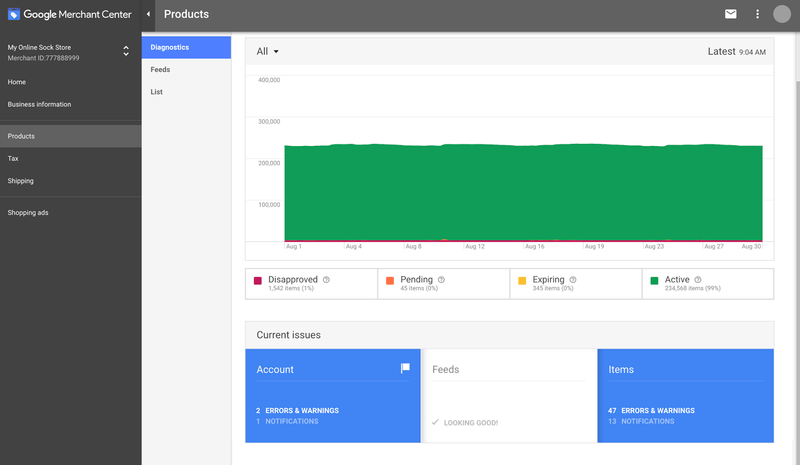
- Track your product performance. See which products get more clicks or sales.
How Does Google Ads Merchant Center Work?
To use Google Ads Merchant Center, you must add your product data. This is called a product feed. It is a file with all your product details. Google reads this file to show your products correctly.
Here are the main steps:
- Create a Merchant Center account. Go to the Google Merchant Center website and sign up.
- Add your business info. Tell Google about your store and website.
- Verify and claim your website. Prove that you own the website where you sell products.
- Create a product feed. List all your products with details like title, price, and image.
- Upload the product feed to Merchant Center. Google will check and use the info.
- Link your Merchant Center to Google Ads. This allows you to create shopping ads.
After this, you can start making ads that show your products. Google will use your feed to show the right product to the right person.
What Information Should You Include in Your Product Feed?
Your product feed must have clear and correct information. Google needs this to show your product well. Here are the most important details:
| Product Detail | Why It’s Important |
|---|---|
| Product Title | Helps buyers know what the product is. |
| Description | Explains the product features and use. |
| Price | Shows how much the product costs. |
| Availability | Tells if the product is in stock. |
| Image | Attracts buyers with a clear photo. |
| Link to Product Page | Where buyers can buy the product. |
| Brand | Helps identify the product maker. |
| GTIN or SKU | Unique product codes for tracking. |
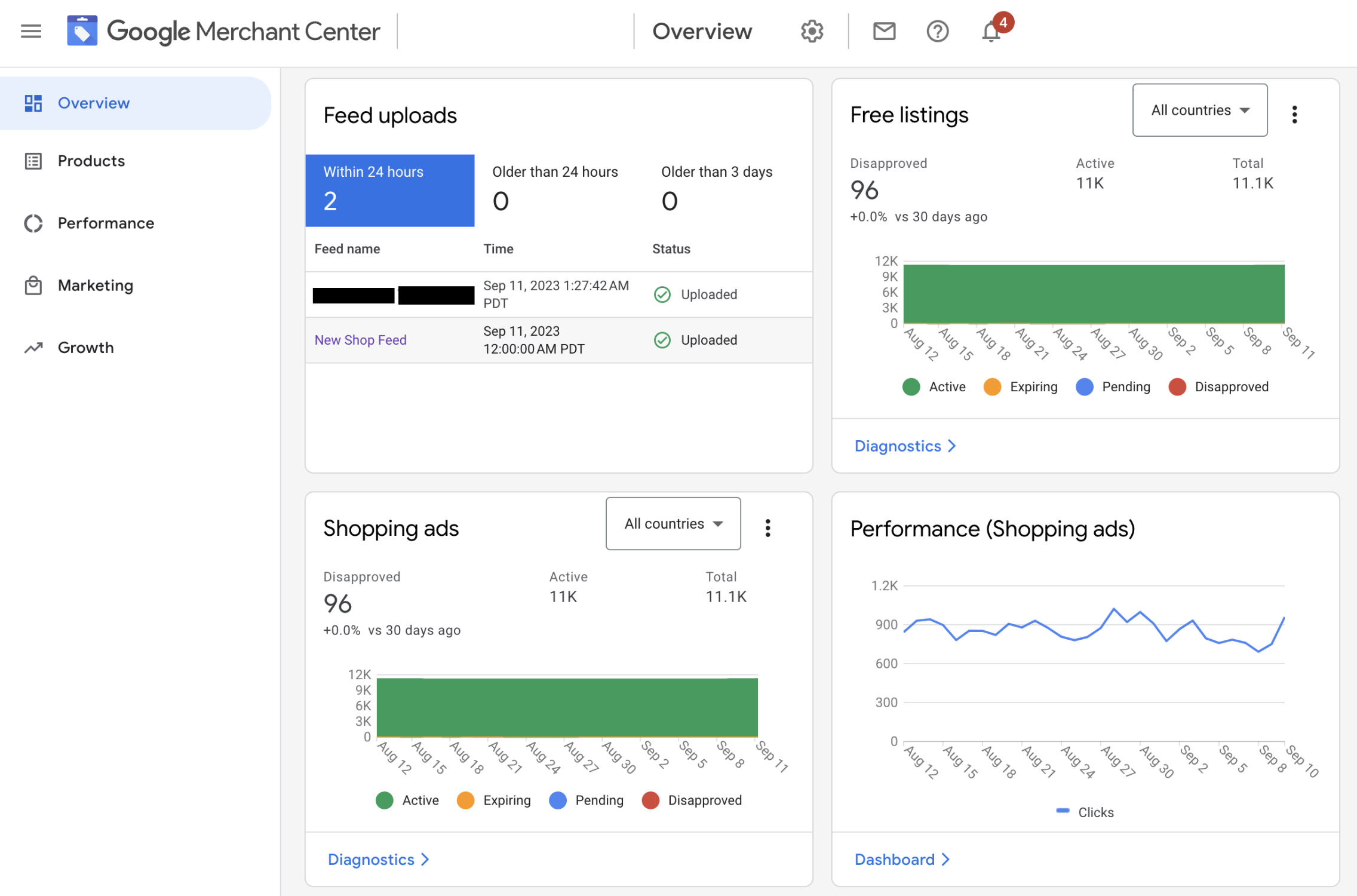
Make sure all details are correct. Wrong info can stop your ads from showing.
Credit: www.clickpilot.co.uk
Types of Ads You Can Run with Merchant Center
When your products are in Merchant Center, you can create different ads. The main type is Shopping Ads. These ads show your product image, price, and store name.
Here are some ad types you can use:
- Shopping Ads: Appear on Google search results and show product info.
- Local Inventory Ads: Show products available in nearby stores.
- Surfaces Across Google: Free listing of your products on Google Shopping tab.
These ads help customers find your products quickly. They also show important details to help buyers decide.
How to Link Merchant Center to Google Ads?
Linking your Merchant Center account to Google Ads is easy. It lets you use your product data to create ads. Here is how to do it:
- Sign in to your Google Merchant Center account.
- Click on the tools icon in the top-right corner.
- Select “Linked accounts” from the menu.
- Find “Google Ads” and click “Link.”
- Enter your Google Ads Customer ID and send a link request.
- Go to your Google Ads account and accept the request.
After linking, you can create Shopping campaigns in Google Ads. These campaigns use your product info from Merchant Center.
Common Problems and How to Fix Them
Sometimes, you might face issues with your Merchant Center account. Here are some common problems and easy fixes:
- Product disapproved: Check if your info follows Google’s rules.
- Feed upload errors: Make sure your file format is correct.
- Website not verified: Complete website verification in Merchant Center.
- Missing or wrong product info: Update your feed with correct details.
- Account suspended: Review Google’s policies and fix issues quickly.
Fixing these problems helps your ads run smoothly.
Tips to Get Better Results with Merchant Center
To get the most from Google Ads Merchant Center, follow these simple tips:
- Keep your product feed updated. Change prices and stock as needed.
- Use clear and good photos. Show your products in the best way.
- Write simple and clear titles. Help buyers understand your products fast.
- Follow Google’s rules. Avoid ad disapproval or account suspension.
- Use Google Ads reports. See which products perform best and improve ads.
Credit: www.wordstream.com
Frequently Asked Questions
What Is Google Ads Merchant Center?
Google Ads Merchant Center is a tool to upload and manage product data for Google Shopping campaigns. It helps businesses show their products in Google search results.
How Do I Create A Merchant Center Account?
Visit the Google Merchant Center website and sign up with your Google account. Enter your business details and verify your website.
Can I Link Merchant Center To Google Ads?
Yes, linking Merchant Center to Google Ads allows you to run shopping ads. This connection helps manage your campaigns effectively.
What Products Can I List In Merchant Center?
You can list physical products like clothes, electronics, and books. Products must follow Google’s policies and be available for sale.
Conclusion
Google Ads Merchant Center is a helpful tool for online sellers. It connects your product info to Google. This helps you show your products in ads and search results. By using it, you can reach more buyers and grow your business.
Remember, keep your product data correct and updated. Link your Merchant Center to Google Ads to create shopping ads. Check your account often to fix any problems. With these simple steps, you can use Google Ads Merchant Center well.
Start today and let more people find your products easily.
